


Calendar 2026
4.6151.00 Reviews
App Specs
- Version
- 1.3.9
- Updated On
- License
- Free
- Downloads
- 1,000,000+
- Developer
- Vruksh Raj
- Categories
- Productivity
- Platform
- Android
Screenshots
 Analysis by AppCompare
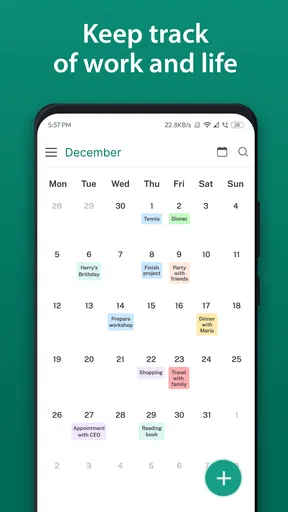
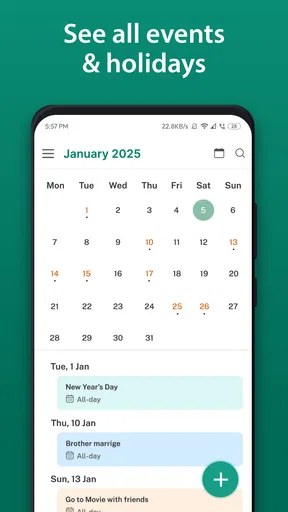
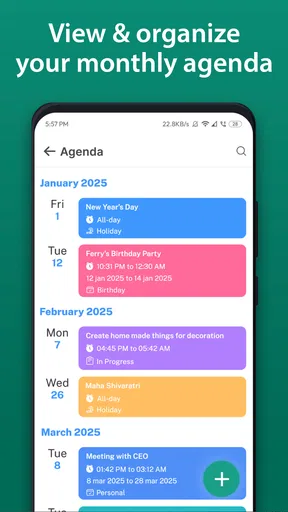
I started using Calendar 2026 as a simple way to keep household plans from getting lost between messages, paper notes, and separate reminder apps. It is a free productivity app from Vruksh Raj, built around calendar planning, tasks, appointments, and an after-call feature. That combination makes it more practical than a calendar that only shows dates, especially when a busy home needs one place to record what has to happen next.
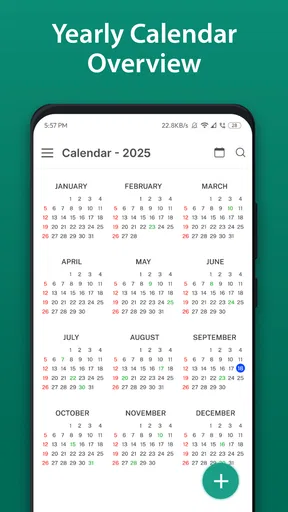
My first impression was that the app is aimed at people who want a straightforward planning tool rather than a large project-management system. The store summary describes it as a calendar with a schedule planner, and that is the right way to understand it. It is useful for arranging everyday commitments, not for replacing a full team workspace. I found its strongest value in turning loose intentions into visible calendar entries that I could check again later.
Using it when several people share a busy household
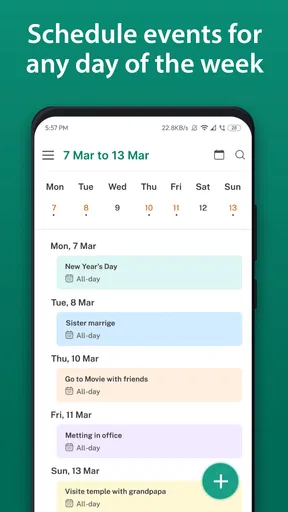
A realistic example is a weekday when one person has a work appointment, another needs to remember a school-related task, and the household has a call to return. In that situation, I would use the calendar view for fixed events, put flexible chores or errands into the task side of the planning process, and use the after-call feature immediately after speaking with someone. That last step matters because a phone conversation often creates a follow-up that is easy to forget once the call ends.
I would not treat the app as a shared family dashboard unless everyone involved has agreed on how it will be used. The useful household workflow is more modest: one person keeps a reliable planning record on the device, then communicates the relevant items to others. This avoids the common problem of several people assuming that somebody else wrote down an appointment.
For a shared device, I would also keep entries clear and neutral. Instead of writing a vague note such as “deal with it,” I would record the action in a way that still makes sense later, such as “call the clinic” or “buy supplies before dinner.” This is one of the less obvious benefits of combining tasks with appointments: the calendar can show when something happens, while the task wording explains what actually needs doing.
The app is especially suitable for a household member who naturally becomes the planner. It can help that person collect appointments, errands, and follow-ups in one routine. However, that convenience should not be confused with automatic coordination. The app does not remove the need to tell other people about changes, and I would not rely on a calendar entry alone for urgent matters.
What I would enter first
When setting up a household routine, I would begin with recurring patterns that are easy to overlook, then add appointments with a clear purpose. After that, I would add tasks that depend on those appointments. For example, an appointment may require a document to be prepared beforehand or a call to be made afterward. Linking those actions mentally through the calendar makes the schedule more useful than a list of isolated dates.
Worth Reading Before You Choose

EA SPORTS FC Mobile 26 Is a Bigger Football Game, but It Takes Time

Flipboard Shows What News Apps Must Do Beyond the Feed

Switching to Android Auto Means Rethinking Your Driving Routine

Google Calendar Makes a Crowded Week Easier to Manage

Ludo King Makes the Most of the Minutes Between Plans

Baby Panda World Brings Quick Play to Modern Phones, but Its Game Library Feels Busy
A practical tip is to write the next action immediately after an appointment is created, rather than waiting until the day arrives. If I schedule a meeting but leave the preparation in my head, the calendar is only showing half the plan. The task planner is most valuable when it captures the small step that turns an appointment into a completed responsibility.
I also found that the app suits short, concrete entries better than long notes. A calendar is easier to scan when each item answers one question: what needs to happen, and when? If I need a detailed record, a separate notes app may be better. Calendar 2026 works best when it remains a practical control panel instead of becoming a storage box for every piece of information.
Keeping setup boundaries clear on a shared device
Before putting personal plans into any calendar app used around the home, I would decide whose information belongs there. A shared phone or tablet can make planning convenient, but it can also blur boundaries. Work appointments, private calls, health-related details, and household errands do not all need the same level of visibility. I would use short descriptions for sensitive items and avoid placing unnecessary personal details in the event title.
This is not a criticism unique to this app; it is a practical limitation of shared-device planning. Calendar 2026 can organize what I enter, but the user still controls the quality and discretion of that information. If several people can open the device, I would keep private matters separate from the household schedule rather than assuming that a calendar entry is confidential.
The app is free, which makes it easy to try without turning setup into a financial decision. It is listed for Everyone, and its minimum operating-system requirement is Android 10. That makes the compatibility question fairly simple for many Android users: check the device software before planning a household migration, especially if an older phone is being reused. The age classification describes the app’s general suitability, not the privacy needs of every entry a person might create.
Its current version is 1.3.9, so I would still take a moment after installation to inspect the available screens and confirm that the workflow feels comfortable on the particular device. Calendar apps can feel very different depending on screen size and how quickly someone can move between a date, a task, and a follow-up. I prefer testing the complete routine with a few harmless entries before transferring an entire schedule.
One useful boundary is to assign responsibility in the wording. If I write “appointment,” I may later forget who is expected to attend or act. A clearer entry might identify the person or the action without exposing more information than necessary. This small habit improves coordination and reduces the chance that a shared calendar becomes a collection of ambiguous reminders.
Where it fits beside familiar alternatives
Compared with a paper planner, Calendar 2026 is easier to revise when an appointment moves and more useful for capturing an after-call action at the moment it appears. Paper still has an advantage for people who enjoy seeing an entire month at a glance without opening a device, and it can be easier to share physically in a kitchen or office. I would choose the app when changes are frequent and forgotten follow-ups are the bigger problem.
Compared with a basic calendar that only records events, this app’s task and after-call focus gives it a more action-oriented feel. That is valuable for errands and responsibilities that do not belong to a precise time. On the other hand, someone who only needs birthdays and appointments may find the extra planning elements unnecessary. A simpler calendar can be quicker for occasional use.
It also occupies a different space from a full collaborative planning service. Those services may be preferable when several people need synchronized ownership, comments, elaborate recurring rules, or a formal team workflow. I would not pick Calendar 2026 for a large organization or a complicated shared operation. Its appeal is the lighter routine: record the schedule, note the task, and remember what needs to happen after a call.
Coordinating appointments, tasks, and after-call actions
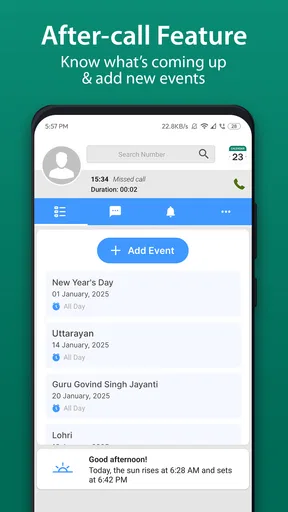
The after-call feature is the part I would build a habit around. Phone conversations often end with phrases such as “send that later,” “check again tomorrow,” or “ask someone else.” Without an immediate note, those commitments disappear into the next conversation. Using the feature directly after the call creates a deliberate pause between finishing the conversation and returning to the rest of the day.
My preferred workflow is to record the follow-up while the details are still fresh, then give it a specific action and a realistic time. I would avoid turning every call into a vague reminder. “Follow up” is less useful than identifying what I need to ask, send, or confirm. This is a concrete way to get more value from the app without adding complexity or relying on memory.
For household coordination, I would separate fixed events from movable tasks. A doctor’s appointment, a delivery window, or a planned call belongs with the schedule because timing matters. Buying an item, preparing paperwork, or checking a message may work better as a task because it can move around the day. Mixing both types into one undifferentiated list makes the calendar harder to read.
Another helpful trade-off is to avoid overloading the day. A calendar can make an ambitious plan look tidy even when it is unrealistic. I would leave space around appointments and avoid assigning every free minute to a task. The app can show the plan, but it cannot judge whether the household has enough time, energy, or transport to complete it.
When plans change, I would edit the original item instead of creating a second version. Duplicate entries are particularly confusing on a shared device because another person may act on the outdated one. A single updated appointment, paired with a clearly rewritten task, keeps the schedule understandable. This is a small discipline, but it is more important than adding ever more reminders.
Questions I would answer before relying on it
Would I use it for a family with different phones? I would use it as a personal planning center, but I would first confirm how the household intends to exchange information. The app is useful for organizing the planner’s responsibilities; it should not be assumed to provide a complete shared-account system. If everyone needs live, coordinated access, a purpose-built collaborative calendar may be a better fit.
Would I give it to a younger user? The Everyone rating makes it broadly suitable in age terms, but I would still consider the device context and the type of information being entered. A child’s school tasks are different from an adult’s private appointments. The rating is not a substitute for deciding what belongs on a shared device or how much guidance a younger user needs.
Can it replace a task manager? For everyday tasks connected to appointments and calls, I think it can be enough. If a person manages long projects, dependencies, detailed notes, or many collaborators, I would choose a dedicated task or project tool instead. Calendar 2026 is strongest when the task has a clear relationship with a day, an appointment, or a follow-up.
Is it suitable for someone who dislikes complicated apps? Probably, provided that person wants more than a bare datebook. The central idea is easy to understand, but any planner becomes less useful if the user refuses to maintain it. The best approach is to begin with appointments and after-call actions, then add broader task planning only if it genuinely helps.
Is it a good choice for an older Android device? It requires Android 10, so the device software matters before anything else. On a compatible device, I would judge it by readability and ease of entry rather than by the number of features. For someone who prefers a large wall calendar or handwritten notes, the app may still feel less immediate even though it is free.
Age, trust, and everyday responsibility
The Everyone content rating is reassuring for general household use, but trust is still a human issue. If several people share access to one device, I would explain what the calendar is for and agree on whether anyone may edit entries. Accidental changes can be just as disruptive as missed reminders, especially when one person assumes the schedule is final.
I would also teach younger or less experienced users to distinguish an appointment from a task. That distinction helps them understand responsibility: an appointment usually happens at a set time, while a task may be completed within a broader window. The app can support that learning because it brings both kinds of planning into the same productivity routine.
For adults, the after-call feature offers a useful lesson in trust as well. If someone promises to handle a follow-up, recording the action makes the commitment visible to the person who made it. I would use that transparency carefully, not as a way to monitor someone, but as a way to reduce misunderstandings. A shared plan works only when entries represent real agreements rather than silent expectations.
There is also a boundary between coordination and surveillance. I would not fill a household calendar with private details simply because the device is accessible. Short, respectful descriptions are enough for most shared planning. If an item requires confidentiality, I would keep it out of the communal routine and use a more appropriate private method.
These considerations do not make the app difficult; they make the workflow more dependable. A calendar is only as trustworthy as the habits around it. Clear ownership, careful wording, and regular updates matter more than adding a large number of entries.
My household verdict after using the planning workflow
Calendar 2026 is a sensible free productivity app for someone who wants appointments, tasks, and post-call actions to live in one practical routine. Vruksh Raj has focused the experience on a familiar need: remembering what is scheduled and what must happen next. The app has reached over 500 thousand installs and holds a 4.7 average from around 7.5 thousand ratings, which suggests that its straightforward approach has attracted a substantial audience.
I would recommend it to a household planner, a busy individual, or anyone who regularly finishes calls with several small commitments to remember. Its best use is not showing off a complicated system; it is preventing ordinary responsibilities from slipping through the cracks. The combination of a calendar and task planning is particularly helpful when an appointment creates preparation or follow-up work.
I would skip it if my main requirement were advanced collaboration, detailed project management, or a guaranteed shared schedule across several accounts. I would also choose a paper planner for a person who strongly prefers handwriting and rarely needs to revise plans. Those are not failures of the app; they are signs that the lighter calendar-and-follow-up model is not the right match.
For my own household use, I would keep the entries concise, separate private information from shared plans, and make the after-call step automatic. I would begin with a small number of real appointments and tasks, then see whether the routine reduces forgotten actions. The app earns its place when it turns a conversation or appointment into a clear next step. If that is the problem you want to solve, this is an easy, focused option to try on a compatible Android device.
Pros
- Simple layout makes dates and months easy to browse.
- Useful for checking weekdays
- weekends
- and public holidays quickly.
- Lightweight app that should work smoothly on older devices.
- Clear month-by-month view is convenient for basic planning.
- Helpful offline access when you need a quick date reference.
Cons
- May offer limited features beyond a standard calendar view.
- Holiday information may vary by country or require manual checking.
- Could feel too basic for users needing reminders or event management.
- Some versions may include ads that interrupt the browsing experience.
- No guarantee that regional holidays are fully accurate or up to date.
FAQs for Calendar 2026
What is Calendar 2026 and what can I use it for?
Calendar 2026 is a planning app designed to help you view and organize the entire 2026 year from your phone. It can be useful for checking dates, weekdays, months, weekends, public holidays, appointments, birthdays, vacations, and other important events. Before downloading, check the app description carefully because the available features may differ between versions, regions, and Android or iOS devices.
Does Calendar 2026 work offline or require an internet connection?
For basic calendar viewing, Calendar 2026 may work without a continuous internet connection once it has been installed. However, features such as holiday updates, synchronization, advertisements, cloud backup, or links to external calendars may require internet access. If offline use is important to you, test the app after installation with mobile data and Wi-Fi disabled, and review its permissions and privacy information before adding personal events.
Can I add appointments, reminders, birthdays, or personal events?
Some Calendar 2026 versions are mainly yearly calendar references, while others include tools for creating appointments, notes, reminders, or recurring events. Do not assume that every version supports notifications or full calendar synchronization. Check whether the app can send alerts, repeat events, edit entries, and export or back up information. These differences are especially important if you plan to replace your phone’s default calendar.
Does Calendar 2026 include public holidays and regional observances?
Holiday information can vary considerably depending on the country, state, language, and app version. Calendar 2026 may display selected national holidays, but it might not include regional observances, religious dates, school breaks, or recently updated public holidays. Before relying on the app for work or travel planning, confirm that your location is supported and compare important dates with an official government or workplace calendar.
Is Calendar 2026 free, and are there advertisements or in-app purchases?
Many calendar apps can be downloaded for free, but they may display advertisements, offer optional purchases, or reserve advanced functions for a premium version. The exact pricing and business model can change over time and may differ between Google Play and the App Store. Read the store listing before downloading, paying particular attention to subscriptions, advertising, trial periods, and whether purchases are refundable.


